Savings Plans
Shared vs. Single Subscription vs. Resource Group. Which Should You Choose?
I kept thinking “we have heard this cost visibility, cloud tagging and attribution story one too many times.” For me, the game changing moment was when Aran began talking about reducing risk, proactive planning, and creating a secondary marketplace.
TLDR:
You've done the analysis. You've gotten buy-in. You're ready to pull the trigger on an Azure Savings Plan and start capturing those discounts. There's just one configuration decision left!
Scope.
It's a single dropdown in the Azure portal. It's also one of the most consequential settings you'll configure, because choosing the wrong one quietly destroys utilization before your Savings Plan even has a chance to work.
Let me walk you through what scope means, why it matters more than people realize, and why Archera sets it the way we do.
When Azure applies a Savings Plan discount to your workloads, it needs to know which resources are eligible to receive that discount. Scope defines the boundary within your Azure billing hierarchy where the discount can land.
Think of it like casting a net. A wide net catches more fish.
The discount rate is the same regardless of scope. But whether that discount actually gets used depends entirely on how much eligible usage sits inside the boundary you've defined.
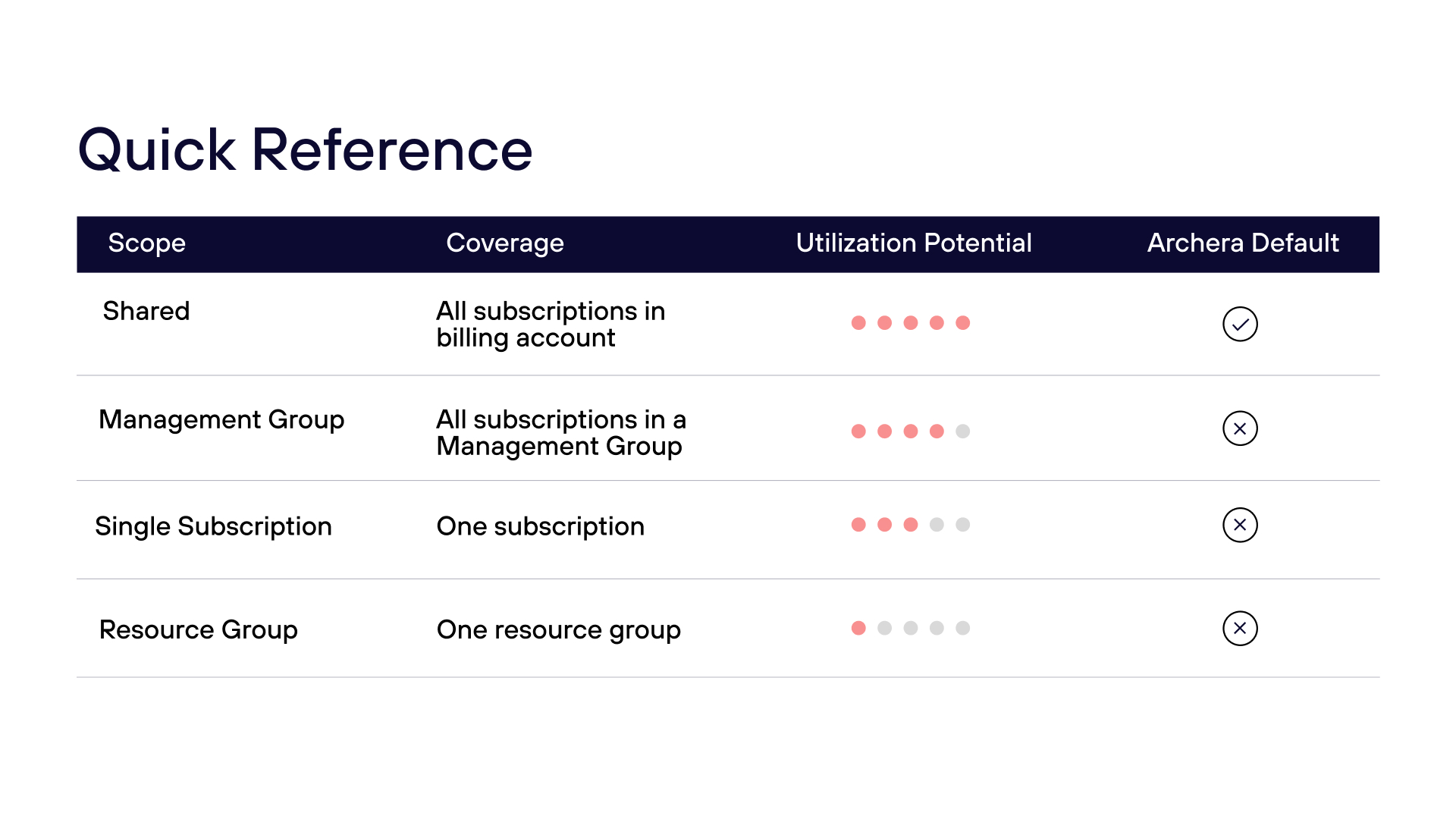
The discount applies across all subscriptions in your billing account (if you're on an Enterprise Agreement) or across all subscriptions and resource groups accessible to your billing profile (if you're on MCA or CSP).
This is maximum flexibility. Azure's billing engine continuously scans your eligible usage and applies the discount wherever it fits best. More resources competing to consume the commitment means higher utilization, less waste, and — ultimately — more actual savings.
This is the scope Archera uses for every Azure Savings Plan we purchase on behalf of customers. We'll come back to why.
The discount applies across all subscriptions within a given Management Group in your Azure hierarchy.
This is a reasonable option for organizations that segment their Azure hierarchy by business unit or environment — for example, a "Production" management group that contains all production subscriptions. It's broader than a single subscription, but narrower than Shared.
The discount applies only to resources within one specific subscription.
This makes sense when a single subscription genuinely owns all the workloads you're committing to. The risk is drift — if your workloads ever migrate to another subscription, your Savings Plan stops covering them, and you start paying for unused commitment.
In a world where workloads move and architectures evolve, "set it and forget it" on a single subscription scope is a bet worth thinking carefully about.
The discount applies only to resources in one specific resource group inside a subscription.
This is the narrowest scope available. It's designed for scenarios where a single team or application owns a dedicated resource group and you need exact cost attribution. The tradeoff is the highest exposure to underutilization — if workloads in that resource group shrink or move, you're paying for commitment that has nowhere to apply.
When Archera purchases Azure Savings Plans on your behalf, we use Shared scope. Not because it's the default, but because it's the right answer for the way commitment optimization actually works.
Archera's recommendations are built on your aggregate consumption patterns across your billing account. We're looking at what you're spending, how it trends, and where the durable baseline usage lives — across all your subscriptions, not just one. Shared scope is the natural pairing: the commitment and the workloads it's designed to cover are measured at the same level.
A narrower scope introduces a mismatch. If we optimize based on aggregate usage but restrict the discount to a single subscription, we've created a situation where the commitment can't fully utilize the usage that justified buying it. That's waste — the thing we're here to prevent.
Higher utilization means more of every dollar you committed is actually generating savings. Lower utilization means you're paying for commitment that never converted to a discount. Shared scope is structurally the highest-utilization option, and that matters.
Not sure how your existing Azure Savings Plans are scoped? Archers can audit your commitment configuration and show you exactly where utilization is leaking across scope, term, and coverage. Get a free audit.
This is the most common question I hear, and it's a fair one.
Narrower scopes — particularly Single Subscription and Resource Group — exist largely to satisfy cost allocation and chargeback use cases. If Finance needs to attribute Azure spend to a specific business unit via a dedicated subscription, the instinct is to scope your commitments there so the discounts show up in the right bucket.
Here's the thing: there's a real tradeoff. Precision in cost attribution vs. efficiency in commitment utilization. A Savings Plan scoped to a single subscription that runs at 60% utilization is generating less actual savings than a Shared-scope plan running at 95% — even if the organizational reporting is cleaner.
The right answer depends on your specific cost allocation architecture, your utilization risk tolerance, and whether the chargeback use case can be served through other means (tagging, cost allocation rules, tooling like Archera's advanced reporting).
If you're working through this tradeoff, reaching out to Archera is a good starting point. We've helped organizations design commitment strategies that satisfy finance requirements without sacrificing the utilization efficiency that makes the savings real.
Need precise cost attribution without sacrificing utilization? We’ve helped FinOps teams design Azure commitment strategies that satisfy chargeback requirements without forcing them into narrower scope. Walk through your setup with an Archera commitment strategist. Book a strategy session.
Can I change the scope of an Azure Savings Plan after purchase?
Yes. Azure allows you to rescope an active Savings Plan at any time, including moving from a narrower scope to Shared. Rescoping isn’t a commercial transaction, so your term and pricing aren’t affected. That said, starting at Shared scope is still the cleaner approach: it avoids any period of underutilization while you’re waiting to make a change, and eliminates the operational overhead of managing scope adjustments later.
What scope should I choose for Azure Savings Plans?
For most organizations, Shared scope delivers the highest utilization and therefore the most actual savings, because the discount can apply across all eligible usage in your billing account rather than being restricted to one subscription or resource group. Narrower scopes make sense when chargeback requirements or organizational boundaries demand it, but come with utilization tradeoffs worth quantifying before committing.
What is the difference between Shared scope and Single Subscription scope?
Shared scope lets the discount apply across all subscriptions in your billing account, maximizing the pool of eligible usage. Single Subscription scope restricts the discount to one subscription, which works when that subscription owns all the workloads you're committing to, but creates underutilization risk if workloads migrate or architecture changes.
Does scope affect the discount rate on an Azure Savings Plan?
No. The discount percentage is identical regardless of scope. Scope only determines which resources are eligible to receive the discount, meaning it affects utilization, not the rate itself. A plan running at 60% utilization delivers less realized savings than a Shared-scope plan at 95%, even if the stated discount is the same.
What happens if workloads move out of a scoped subscription or resource group?
The Savings Plan continues to run — and charge — but the discount no longer has eligible usage to apply to. You pay for committed spend that generates no discount. This is the core underutilization risk of narrow scopes, and one of the primary reasons Archera defaults to Shared.
Can I use Shared scope and still do chargeback by subscription or team?
Yes. Scope and cost allocation are separate concerns. Shared scope controls where the discount lands; chargeback attribution can be handled through tagging, cost allocation rules, or tooling like Archera's reporting, without restricting the discount boundary and sacrificing utilization efficiency.
Scope isn't a bureaucratic technicality. It's the lever that determines how much of your committed spend converts to savings, versus sitting idle while your on-demand charges pile up on the other side of an arbitrary boundary.
When you commit without thinking about scope, you're leaving part of that commitment on the table before you've even started. When Archera buys commitments on your behalf, we default to Shared because maximizing utilization is the whole point.
If your organization has specific requirements that push toward a narrower scope, let's talk through it. The goal is always the same: maximize the savings you capture, not just the savings you technically purchased.
Not sure how your existing Azure commitments are scoped, or whether they’re actually utilizing the coverage you paid for? Archera can audit your current commitment configuration and show you exactly where efficiency is being left on the table. Visit Archera to get started.


.svg)
.svg)
.svg)
.svg)
.svg)